Vertical Laptop Stands for Small Desks: Check Laptop Thickness, Device Fit, and Closed-Lid Workflow Before You Buy
A vertical laptop stand can look like one of the easiest ways to reclaim desk space.
Instead of leaving a laptop open across a large part of the desktop, you place it upright, connect the equipment you need, and use the remaining surface for a monitor, keyboard, mouse, notebook, or other work gear.
But on a small desk, the buying problem is not simply whether a stand has a small base.
The stand has to fit the exact laptop, hold it in the intended orientation, leave the ports and cables usable, sit in a stable location on the desk, and support the way you actually plan to work.
That creates the Fit-First rule for this guide:
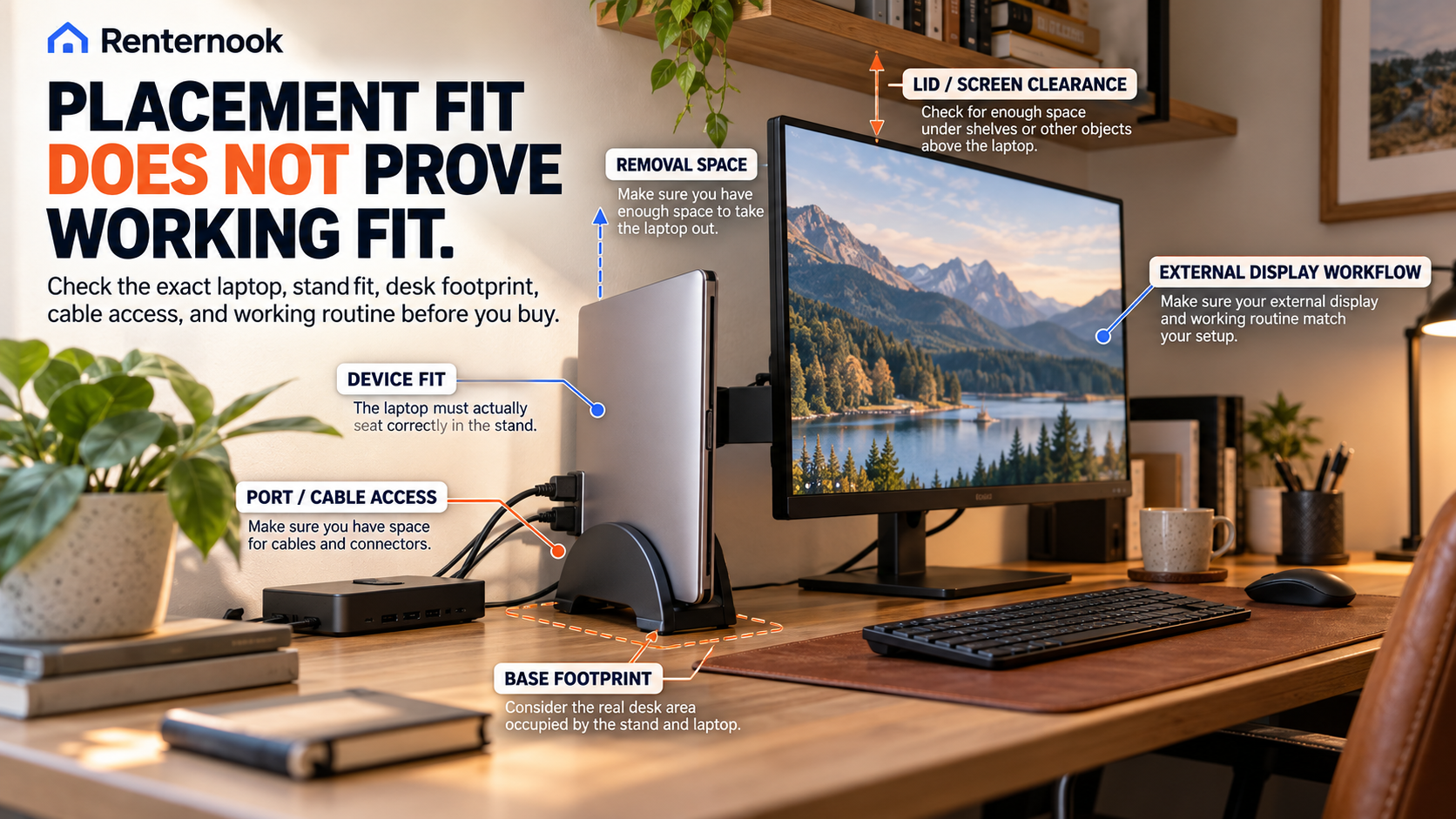
Placement fit does not automatically prove working fit.
A laptop can physically sit in a vertical stand and still fail the real setup because the slot is too loose or too tight, the device leans, a case changes the fit, the base conflicts with another desk item, a charging cable is blocked, the lid cannot move as expected, or the closed-lid desktop workflow does not work with the exact laptop and accessories.
This guide compares two locked Twelve South product roles:
- Twelve South BookArc Flex — flexible single-laptop fit without separate inserts
- Twelve South BookArc for MacBook — model-specific MacBook fit using silicone inserts
They are not ranked from best to worst.
Both products come from the same brand. The purpose of the comparison is to show why two vertical stands with similar desk-saving goals can create very different device-fit decisions.
The links in this guide are direct manufacturer and support sources used for product evidence. Renternook did not physically test either stand. Recheck the current product page, exact laptop model, and current compatibility guidance before buying.
Start With the Laptop, Not the Stand
The easiest mistake with a vertical laptop stand is starting with the stand dimensions and assuming a small base solves the whole desk problem.
Start with the exact laptop instead.
Record:
- brand and exact model name;
- model number where available;
- closed-device thickness;
- edge shape and taper;
- whether you use a hard shell, sleeve, skin, or case;
- the location of charging, display, USB, audio, and other ports you actually use;
- whether the device will be stored upright only or used in a closed-lid desktop workflow;
- whether the laptop must be removed frequently during the day.
For a small desk, the stand is only one part of a compact workstation.
If you are still choosing the desk itself, see Renternook’s guide to desks for small spaces for a broader check of usable desktop area and working clearance.
If your vertical-stand plan depends on an external display, the separate Renternook guide to monitor arms for small desks covers the monitor-side fit problem.
The 8-Part Vertical Laptop-Stand Fit Check
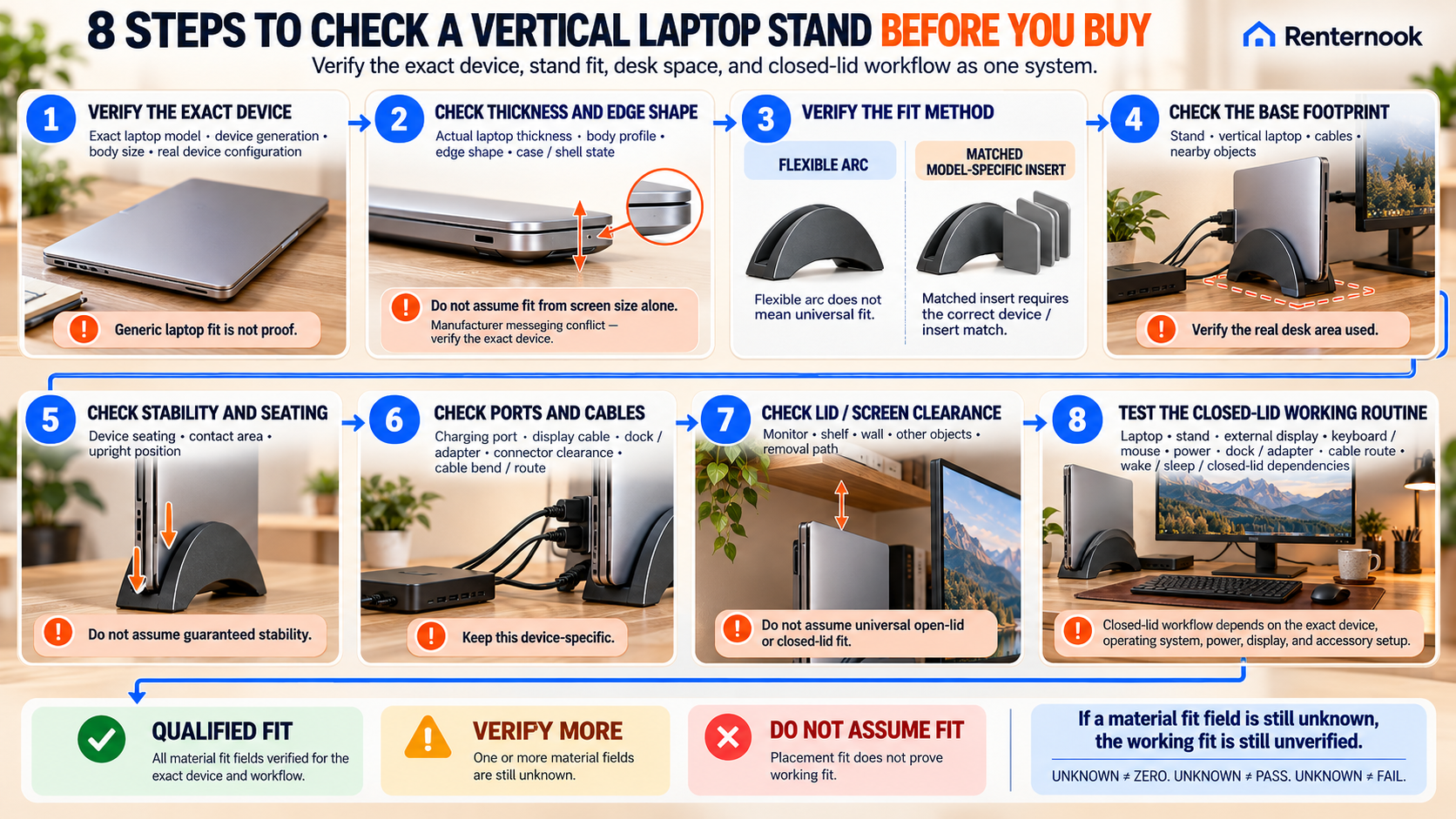
Before comparing the two stands, separate the buying decision into eight checks.
1. Verify the exact laptop model
Do not buy from screen size alone.
Two laptops with the same nominal screen size can have different body thicknesses, edge curves, feet, port locations, and case dimensions.
For BookArc for MacBook, the model number is a direct compatibility input because the insert system is model-specific.
For BookArc Flex, the manufacturer publishes broader dimensional compatibility, but the exact laptop still needs to be checked against the stand’s fit boundary.
2. Check laptop thickness and edge shape
Thickness is a hard fit gate for a slot-style stand.
BookArc Flex publishes compatibility up to 1 inch thick, but the product page contains a separate unresolved screen-size conflict discussed later in this guide.
BookArc for MacBook does not use one universal open slot. Its silicone insert is matched to specific MacBook models, so the relevant question is not simply whether the laptop is below a generic thickness number.
The edge shape matters too.
A stand can be the right nominal width and still seat poorly if the device edge shape does not match the stand or insert.
3. Verify the slot or insert system
This is the biggest architectural difference between the two products.
BookArc Flex uses a flexible arc and does not require a separate device-specific insert for the qualified role in this guide.
BookArc for MacBook uses silicone inserts, and the correct insert varies by exact MacBook model.
Do not transfer one fit logic to the other.
A flexible slot is not the same decision as a model-matched insert.
4. Measure the stand footprint and placement zone
A vertical stand saves horizontal laptop footprint, but the stand still occupies desk space.
The locked base dimensions are:
- BookArc Flex: 3.6 × 8.43 inches
- BookArc for MacBook: 3.60 × 8.46 inches
On a small desk, mark that base on the actual surface before buying.
Then check what sits around it:
- monitor base or monitor-arm hardware;
- keyboard position;
- speakers;
- charging dock;
- notebook space;
- desk lamp;
- wall clearance;
- cable path.
A compact stand that fits by itself can still fail if its best placement blocks something else.
5. Check device seating and stability limitations
Do not turn a manufacturer mechanism claim into a universal stability guarantee.
Twelve South describes BookArc Flex as using the laptop’s weight to secure the flexible arcs around the device. The manufacturer also advises placing the laptop as straight as possible in the stand.
That is useful mechanism guidance, but Renternook did not independently test the stand for every laptop or every desk condition.
For BookArc for MacBook, the manufacturer describes the silicone insert as holding the MacBook in place. Again, the exact insert and exact device matter.
If the fit is loose, tilted, case-altered, or based on an unsupported device, do not assume the stand is qualified simply because the laptop remains upright.
6. Check port and cable access
A vertical stand changes where the laptop’s side ports sit relative to the desk surface, wall, monitor, and cable route.
Before buying, map the cables you actually use:
- charging;
- external monitor;
- USB or Thunderbolt devices;
- audio;
- Ethernet adapter;
- storage drives;
- dock or hub connection.
BookArc for MacBook includes a manufacturer-described Cable Catch to keep cords in place when unplugged.
That feature does not prove every cable layout will work.
Check connector direction, bend radius, plug size, and whether you can remove the laptop without dragging cables across the desk.
7. Check lid and screen clearance
A vertical stand may be used with the laptop closed, but the stand’s physical fit does not prove the laptop supports every closed-lid workflow.
Check:
- whether the device is intended to remain closed in the planned setup;
- whether the lid is fully closed before placement if required by the stand or workflow;
- whether the screen edge or hinge is being loaded in an unintended way;
- whether nearby objects interfere with insertion or removal;
- whether the laptop needs to be opened while still near the stand.
Do not claim universal closed-lid compatibility from the stand alone.
8. Verify the full closed-lid workflow
Only after the physical fit checks should you test the actual desktop routine.
If you plan to use the laptop as a closed desktop computer, verify the exact device requirements for:
- external display;
- keyboard and pointing device;
- power or charging state;
- wake/sleep behavior;
- dock or hub behavior;
- reconnecting after removal;
- the way you transition between portable and desk use.
The stand can fit perfectly while the workflow still fails.
That is why placement fit and working fit are separate gates.
Quick Comparison: Two Vertical Laptop-Stand Roles
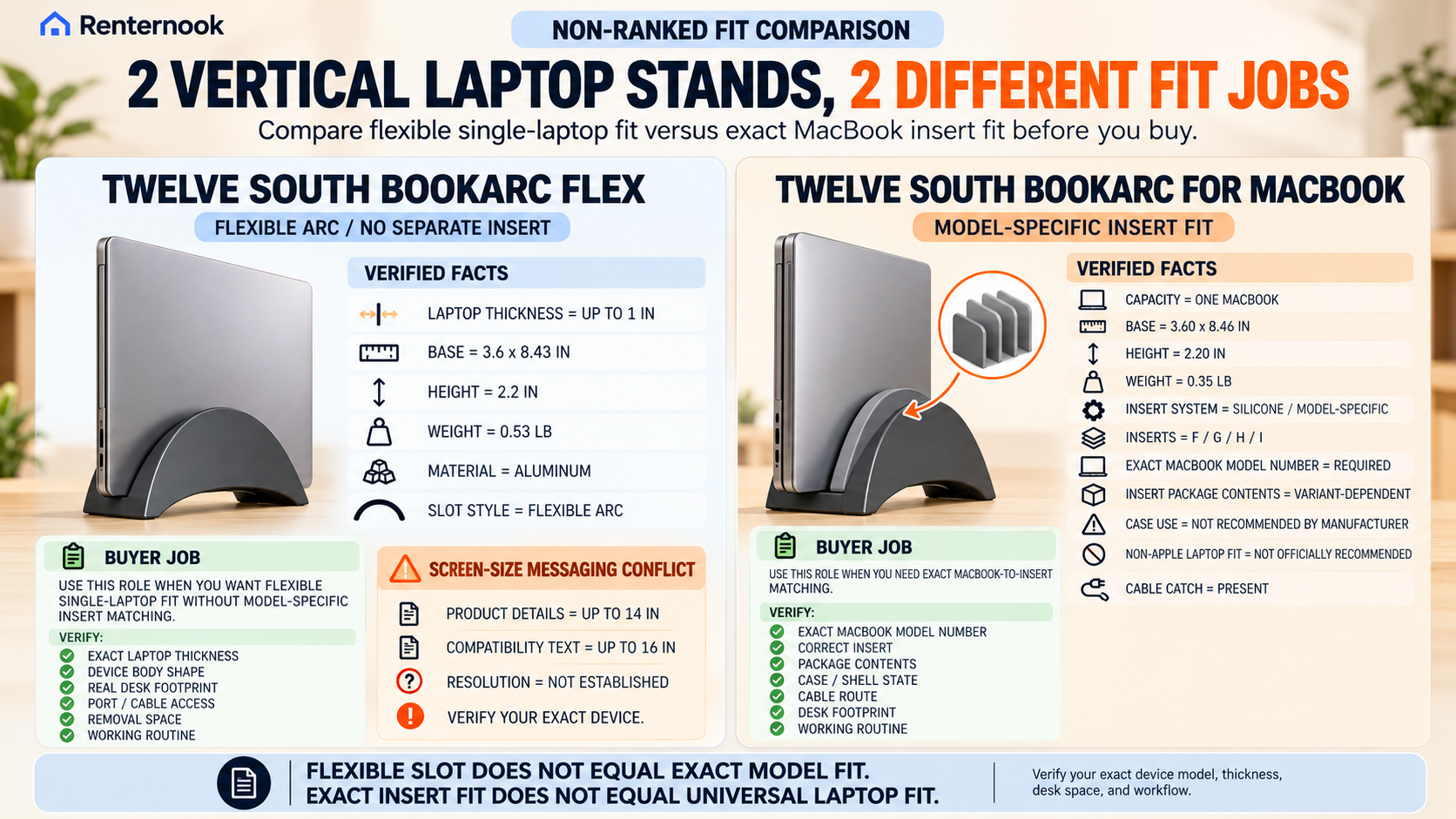
| Product | Locked role | Base | Height | Weight | Device-fit architecture | Critical fit boundary |
|---|---|---|---|---|---|---|
| Twelve South BookArc Flex | Flexible single-laptop fit without separate insert | 3.6 × 8.43 in | 2.2 in | 0.53 lb | Flexible arc | Up to 1 in laptop thickness; manufacturer screen-size statements conflict between 14 in and 16 in |
| Twelve South BookArc for MacBook | Model-specific MacBook fit using inserts | 3.60 × 8.46 in | 2.20 in | 0.35 lb | Silicone model-specific insert | Exact MacBook model number and matching insert required |
This table is not a ranking.
It shows two different buyer jobs:
- Flex: verify whether the exact laptop fits a flexible no-insert architecture.
- BookArc for MacBook: verify whether the exact MacBook model matches the correct insert and package configuration.
Unknown does not mean zero, pass, or fail.
1. Twelve South BookArc Flex — Flexible No-Insert Role
Official product page: https://www.twelvesouth.com/products/bookarc-flex
What This Role Adds
BookArc Flex is the broader-fit role because the manufacturer uses a flexible arc rather than a set of model-specific silicone inserts.
The published physical specifications are:
- base width: 3.6 inches;
- base length: 8.43 inches;
- height: 2.2 inches;
- weight: 0.53 lb;
- material: aluminum;
- laptop thickness: up to 1 inch.
The manufacturer describes the design as holding a MacBook or laptop vertically while connected to an external monitor, keyboard, and mouse.
That establishes the intended product role.
It does not establish universal fit for every laptop inside a broad screen-size category.
The 14-Inch vs. 16-Inch Manufacturer Conflict
This is the most important claim-control issue for BookArc Flex.
The same manufacturer page currently uses two different screen-size statements.
In the product-details and feature text, Twelve South describes the stand as fitting most laptops with screens up to 14 inches and up to 1 inch thick.
In the compatibility section, the page states compatibility with MacBook Air, MacBook Pro, MacBook Neo, and most laptops up to 16 inches and 1 inch thick.
The resolution is not established in the locked research.
Do not silently choose the larger number.
Do not market this as universal 16-inch compatibility.
The safer Fit-First interpretation is:
Treat 1-inch thickness as a published physical boundary, but verify the exact laptop model because the manufacturer’s screen-size statements conflict.
Screen diagonal alone should not be used as the final fit test.
Flexible Arc Does Not Mean Universal Geometry
Twelve South describes the flexible design as working without separate adjustments or inserts.
That simplifies one part of the buying decision, but it does not remove the need to check the exact laptop.
Verify:
- closed-device thickness;
- edge shape;
- whether the device sits upright rather than leaning;
- whether a shell or case changes the contact geometry;
- whether the ports remain accessible;
- whether the stand location keeps the laptop away from another object that could push or pull it.
A no-insert architecture is a fit mechanism, not a universal pass.
Stability Is a Manufacturer Mechanism Claim
The manufacturer states that the flexible arcs use the weight of the laptop to secure the device and recommends setting the laptop as straight as possible in the stand.
That information is relevant to use.
It is not independent evidence that every supported laptop will remain stable under every desk condition.
Desk vibration, accidental bumps, cable pull, pets, device geometry, and off-center placement can all change the real setup.
This guide therefore does not make a guaranteed-stability claim.
Small-Desk Placement Check
The 3.6 × 8.43-inch base is compact compared with the footprint of an open laptop, but the stand still needs a usable zone.
Mark the base on the desk and test at least three possible positions:
- beside the monitor;
- behind the monitor or display area if physically accessible;
- near the desk edge where cables can reach without pulling the laptop sideways.
The manufacturer shows behind-monitor placement as one possible desk-saving arrangement, but that does not prove it works with every monitor base, monitor arm, wall distance, or cable route.
When This Role Is Relevant
BookArc Flex is the role to consider when:
- you want a single-laptop vertical stand without device-specific inserts;
- your laptop is within the published thickness limit;
- your exact device passes the real slot and stability check;
- you are willing to verify the unresolved screen-size guidance rather than relying on a 16-inch marketing claim;
- your ports and cables remain usable in the chosen desk position.
This is not a claim that Flex is universally better than BookArc for MacBook.
It is the more flexible fit architecture of the two locked roles.
What Remains Setup-Specific or Unknown
The current evidence does not establish:
- universal fit for every 16-inch laptop;
- a resolved single screen-size ceiling between the conflicting 14-inch and 16-inch statements;
- fit with every shell or case;
- independent stability performance across all laptops;
- universal scratch-free contact;
- universal closed-lid workflow compatibility;
- the best location on your exact desk.
Keep those as verification items.
2. Twelve South BookArc for MacBook — Model-Specific Insert Role
Official product page: https://www.twelvesouth.com/products/bookarc-for-macbook
Manufacturer support sources: https://support.twelvesouth.com/en-US/are-bookarc-inserts-available-separately-from-the-stand-291261
https://support.twelvesouth.com/en-US/can-i-use-bookarc-if-i-have-a-case-on-my-macbook-317545
https://support.twelvesouth.com/en-US/can-i-use-a-pc-in-bookarc-for-macbook-291353
What This Role Adds
BookArc for MacBook uses a different fit philosophy.
Instead of asking a flexible slot to adapt to a range of laptops, the stand uses a silicone insert matched to specific MacBook models.
The published stand dimensions are:
- base width: 3.60 inches;
- base length: 8.46 inches;
- height: 2.20 inches;
- weight: 0.35 lb;
- capacity: one MacBook.
The product page also identifies a Cable Catch and describes the insert as the device-support interface.
Exact MacBook Model Number Is a Required Input
For this product, “13-inch MacBook” or “16-inch MacBook” is not enough information.
The product page maps inserts to specific MacBook generations and model numbers.
Examples from the current manufacturer page include:
- Insert F for specified MacBook Air and 16-inch MacBook Pro models;
- Insert G for specified 16-inch MacBook Pro M1/M2 models;
- Insert H for specified 13-inch and 14-inch MacBook Pro models;
- Insert I for specified MacBook Air models.
The important buying rule is not the letter itself.
It is:
Find the exact MacBook model number first, then match that model to the current insert chart.
A similar-looking MacBook from another year can require a different insert.
Do Not Assume All Inserts Are in the Box
Package contents are variant-dependent.
The current product page separates what is in the box from at least one insert that is not included in the standard box and may be added based on the selected product variant.
Twelve South also publishes support information for replacement or legacy inserts sold separately for the current BookArc generation.
So do not make either of these assumptions:
- every insert comes with every BookArc package;
- an insert you already own necessarily fits the current or older stand version.
Verify the exact stand generation, selected product variant, and insert contents before ordering.
A Case or Shell Changes the Fit
Twelve South specifically warns that a MacBook case or shell changes how the device fits the insert.
The support guidance says a case can cause the MacBook to lean, make removal more difficult, or shift the insert during insertion or removal.
The manufacturer therefore does not recommend using BookArc with a case or shell on the MacBook.
That is a stronger boundary than a generic “measure the case thickness” instruction.
For this product, if you intend to keep a shell on the MacBook, treat that as a compatibility problem rather than assuming the insert can absorb the difference.
Non-Apple Laptop Fit Is Not Officially Recommended
The BookArc for MacBook insert geometry is designed around MacBook thickness and edge shape.
Twelve South’s support guidance states that small thickness differences can cause a laptop not to fit or to lean, and that a flatter PC edge may not seat correctly.
The manufacturer does not officially recommend using this BookArc for non-Apple laptops.
Do not convert this product into a generic PC-laptop recommendation.
That is one of the main reasons it remains a separate buyer role from BookArc Flex.
Cable Catch Is Useful, but Cable Routing Still Needs a Check
The product page lists the Cable Catch as a feature intended to keep cords in place when the MacBook is unplugged.
That can help with a repeated dock-and-go workflow.
But it does not establish that every charging cable, display connector, hub, or dock will route correctly on every small desk.
Check:
- plug direction;
- connector clearance;
- whether the cable pulls sideways on the laptop;
- whether the cable remains reachable after the laptop is removed;
- whether a dock or hub has its own footprint and cable-bend requirements.
When This Role Is Relevant
BookArc for MacBook is the role to consider when:
- you have an exact supported MacBook model;
- you can identify the correct insert for that model;
- you have verified what insert is actually included or separately required for the selected variant;
- you do not plan to use the MacBook in a case or shell contrary to the manufacturer’s guidance;
- you want a model-specific insert interface rather than a flexible no-insert architecture;
- the Cable Catch and stand placement fit your actual desk workflow.
Again, this is not a quality ranking.
It is a stricter model-matching architecture.
What Remains Setup-Specific or Unknown
The current evidence does not establish:
- that every BookArc package contains every insert;
- universal fit across all MacBook generations;
- support for non-Apple laptops;
- fit with a MacBook case or shell;
- guaranteed scratch-free contact;
- guaranteed stability under every desk condition;
- universal closed-lid behavior for every MacBook and accessory setup.
These boundaries should stay visible in the buying decision.
Flexible Arc vs. Model-Specific Insert: Why the Decision Changes
Both stands place one laptop vertically, and their base dimensions are very similar.
That does not make them interchangeable.
The fit logic is different.
If you change laptops often
BookArc Flex reduces dependence on model-specific inserts, but the exact new laptop still needs to fit the published thickness boundary and real arc geometry.
The unresolved 14-inch versus 16-inch manufacturer statements mean you should not use screen size alone as the upgrade rule.
If you use a supported MacBook and want a model-specific seat
BookArc for MacBook uses the insert system as the fit gate.
That can make compatibility more explicit when the exact MacBook model appears in the current chart.
The tradeoff is that the insert becomes part of the compatibility chain.
Wrong insert, wrong stand generation, or wrong package assumption can break the fit.
If you use a case
This is a meaningful split.
BookArc for MacBook has explicit manufacturer guidance against using a case or shell.
For BookArc Flex, the locked evidence does not establish a universal case-compatibility rule.
Do not assume either product is case-safe without verifying the exact setup.
If desk placement is the main constraint
The bases are nearly the same size:
- Flex: 3.6 × 8.43 in
- BookArc for MacBook: 3.60 × 8.46 in
The better decision therefore depends less on a tiny base-dimension difference and more on where the laptop, cables, display, and accessories need to sit.
If you use a non-Apple laptop
BookArc for MacBook is not officially recommended by the manufacturer for non-Apple laptops.
BookArc Flex is the relevant locked role to investigate instead, but only after verifying the exact device against the unresolved compatibility statements and thickness boundary.
What to Measure and Verify Before You Buy
Use this sequence with the actual laptop and desk.
A. Laptop identity
Record:
- exact model name;
- model number;
- year or generation if relevant;
- closed thickness;
- whether a case or shell is installed.
If you are unsure which specification belongs to the exact device, see Renternook’s guide to reading product dimensions before buying for the broader verified-versus-unknown method.
B. Stand fit
For Flex:
- verify thickness;
- verify the real arc fit;
- do not rely on the 16-inch statement without checking the exact device.
For BookArc for MacBook:
- identify the exact MacBook model number;
- identify the matching insert;
- verify that the insert is included or otherwise available for your selected stand variant.
C. Desk footprint
Mark the stand base on the desk.
Then place or outline the surrounding items:
- monitor;
- keyboard;
- mouse;
- dock;
- speakers;
- notebook;
- charging hardware.
Check both the stand footprint and the access path for inserting and removing the laptop.
D. Cable route
Connect the same cables you plan to use.
Check:
- plug clearance;
- cable bend direction;
- slack for removal;
- whether unplugged cables remain accessible;
- whether cable tension can pull on the upright laptop.
E. Closed-lid workflow
Simulate the full routine:
- arrive with the laptop;
- place it in the stand;
- connect power and display hardware;
- wake the system;
- use the external keyboard and pointing device;
- disconnect;
- remove the laptop;
- leave the cables ready for the next session.
If one step creates a repeated conflict, the stand may fit physically but fail the workflow.
Common Buying Mistakes
Mistake 1: Buying by screen size alone
Screen diagonal is not the same as body thickness or edge geometry.
This is especially risky for BookArc Flex because the manufacturer page currently contains different 14-inch and 16-inch screen-size statements.
Mistake 2: Assuming “flexible” means universal
BookArc Flex removes the insert-matching step, but it still has a published thickness boundary and an unresolved screen-size conflict.
Exact-device verification still matters.
Mistake 3: Buying BookArc for MacBook without checking the model number
The insert system is model-specific.
A broad name such as “MacBook Pro 14” is not enough if multiple generations use different model numbers or insert mappings.
Mistake 4: Assuming all inserts come in every package
They do not necessarily.
Package contents and insert availability are variant-dependent.
Mistake 5: Ignoring a laptop case
For BookArc for MacBook, the manufacturer explicitly does not recommend using the stand with a case or shell.
Do not treat the case as a harmless extra millimeter.
Mistake 6: Treating upright storage as proof of stability
A laptop remaining vertical during a quick test does not prove the stand is qualified for every desk condition.
Check real placement, cable pull, desk movement, and seating angle.
Mistake 7: Forgetting the ports
A stand can save desk area and still create a bad cable route.
Port access and cable direction are working-fit checks.
Mistake 8: Assuming the stand creates closed-lid compatibility
The stand is only the physical holder.
Closed-lid desktop behavior depends on the exact laptop and accessory setup.
Mistake 9: Ignoring insertion and removal space
The base can fit while the laptop cannot be lifted out cleanly because a shelf, monitor, wall, or cable blocks the vertical path.
Check the movement path, not just the stored footprint.
Renter and Damage Considerations
A freestanding vertical laptop stand does not require wall mounting, but that does not justify a universal renter-safe or damage-free claim.
Check:
- whether the stand base can mark or scratch the desk finish;
- whether the laptop contact surface is appropriate for the exact device;
- whether a case changes the intended contact geometry;
- whether cable tension can pull the stand or device across the desk;
- whether the stand sits where it can be bumped during normal use.
The correct boundary is simple:
Freestanding does not automatically mean scratch-free, damage-free, or risk-free for every desk and laptop.
Final Fit-First Decision
For a small desk, a vertical laptop stand should pass four layers before you buy.
1. Device fit
The exact laptop matches the stand architecture.
For Flex, that means verifying the exact device against the flexible arc, thickness boundary, and unresolved manufacturer screen-size statements.
For BookArc for MacBook, that means verifying the exact MacBook model number and matching insert.
2. Placement fit
The stand base fits the real desk without blocking the monitor, keyboard, dock, lamp, notebook space, or laptop removal path.
3. Connection fit
The charging, display, and accessory cables can connect and disconnect without creating an awkward or unstable route.
4. Working fit
The complete portable-to-desktop routine works with the exact laptop, display, keyboard, mouse, power state, and removal pattern.
The two locked products solve different parts of that decision:
- Twelve South BookArc Flex uses a flexible no-insert architecture and publishes a 1-inch laptop-thickness boundary, but its own page currently conflicts between 14-inch and 16-inch screen-size statements.
- Twelve South BookArc for MacBook uses model-specific silicone inserts and therefore requires the exact MacBook model number and correct insert/package verification.
Neither gets a universal laptop-fit claim.
Neither gets a guaranteed-stability claim.
Neither gets a guaranteed scratch-free claim.
Neither proves that your closed-lid workflow will work simply because the laptop fits in the stand.
Verify the exact device.
Mark the base footprint.
Check the slot or insert.
Map the cables.
Test insertion and removal.
Then verify the full closed-lid workflow before you buy.
That is the Fit-First decision.
Sources and Methodology
Renternook did not physically test these products. Product-specific claims in this guide were checked against first-party Twelve South product and support sources for the locked products.
Twelve South BookArc Flex
Official product page: https://www.twelvesouth.com/products/bookarc-flex
Evidence boundary: The manufacturer page currently contains different screen-size statements: product/feature text references up to 14-inch screens, while the compatibility section references most laptops up to 16 inches. This article does not resolve that conflict by choosing one number.
Twelve South BookArc for MacBook
Official product page: https://www.twelvesouth.com/products/bookarc-for-macbook
Insert availability support: https://support.twelvesouth.com/en-US/are-bookarc-inserts-available-separately-from-the-stand-291261
MacBook case guidance: https://support.twelvesouth.com/en-US/can-i-use-bookarc-if-i-have-a-case-on-my-macbook-317545
Non-Apple laptop guidance: https://support.twelvesouth.com/en-US/can-i-use-a-pc-in-bookarc-for-macbook-291353
Internal Renternook guides used for decision context
Desks for Small Spaces: https://renternook.com/2026/09/01/desks-for-small-spaces-a-fit-first-guide-to-width-depth-and-chair-clearance/
Monitor Arms for Small Desks: https://renternook.com/2026/10/23/monitor-arms-small-desks/
How to Read Furniture Dimensions Before Buying: https://renternook.com/2026/10/03/how-to-read-furniture-dimensions-before-buying/
Evidence boundaries
- Keyword lock remains unavailable; this article does not invent keyword volume or claim a keyword lock.
- Current GSC query × page evidence remains unknown / blocked.
- Full topic-pipeline coverage remains partial.
- The canonical governance document remains unavailable.
- UGREEN 60643 remains excluded and is not presented as a qualified recommendation.
- Both qualified products are from Twelve South; brand diversity is therefore not present in this product set.
- Exact buyer-device fit remains a verification step.
- Unknown fit-critical values stay unknown rather than being converted to zero, pass, or fail.
- Product prices, stock, review scores, affiliate placement, and unsupported performance rankings are not used as recommendation claims.