Small Printer Stands for Home Offices: Check the Working Fit, Not Just the Printer Footprint
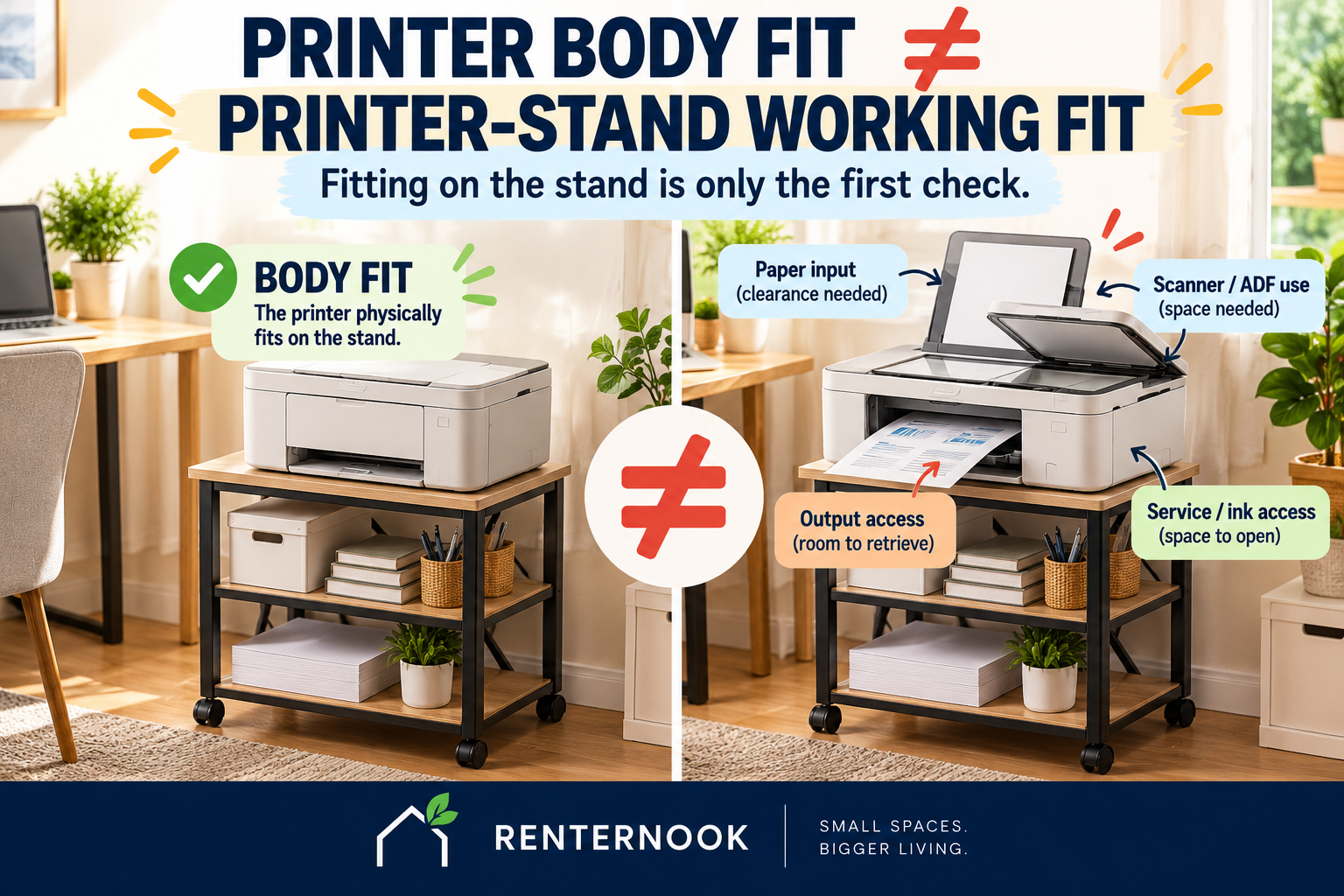
A printer can fit on top of a stand and still be a poor fit for the way you actually use it.
That is the central problem with shopping for a small printer stand by width and depth alone. A printer is not a static box. Paper has to go in. Printed pages have to come out. A scanner lid or automatic document feeder may need room to operate. Ink, toner, paper jams, cables, and controls may need access. If the stand has shelves, drawers, or casters, those parts add their own working states too.
So the useful question is not simply, “Does the printer fit on the stand?”
It is:
Can the exact printer and the exact stand work together in the exact place where you plan to use them?
That is why this guide uses a stricter rule:
PRINTER BODY FIT ≠ PRINTER-STAND WORKING FIT.
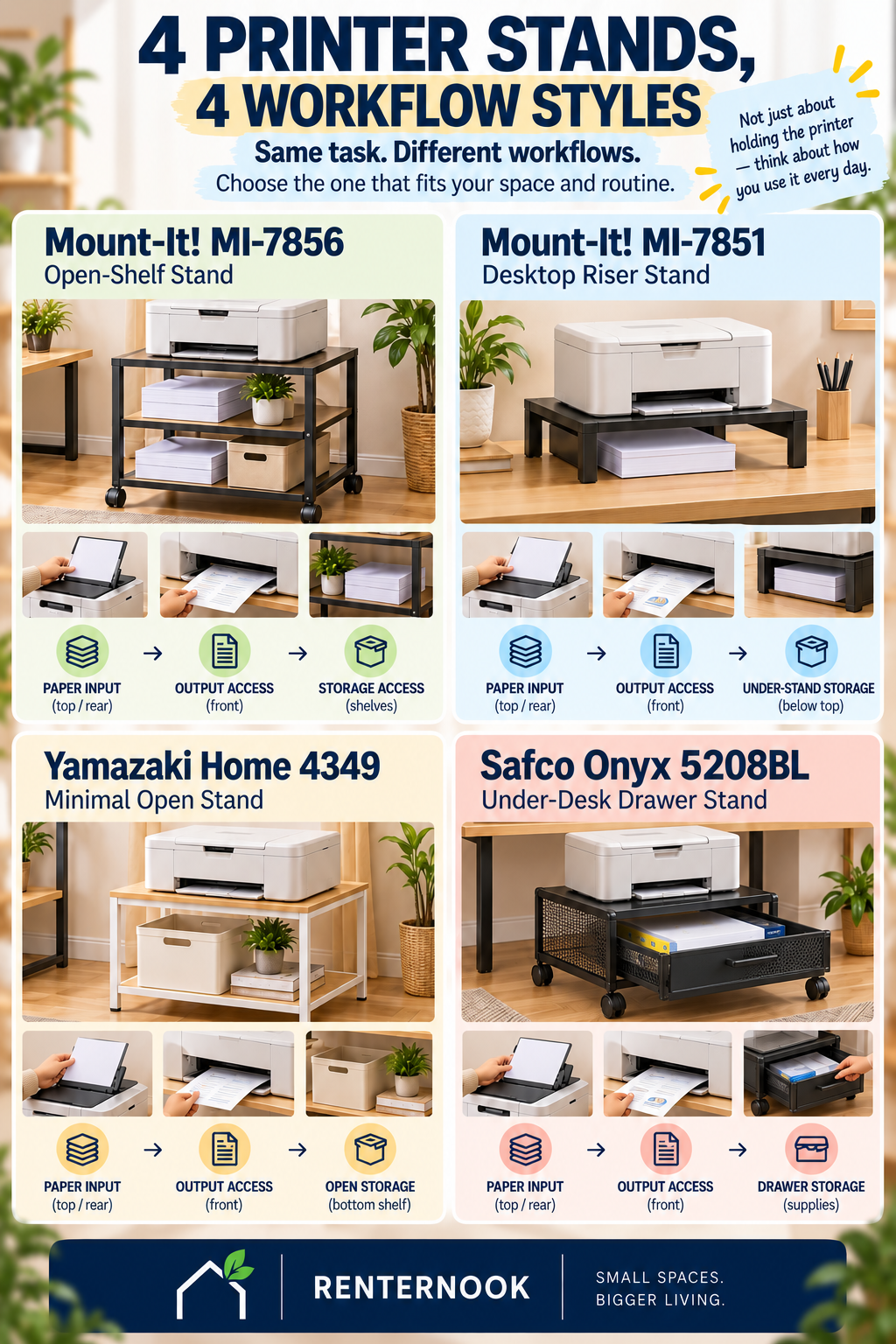
The four stands below are not ranked. They represent four different support architectures: a large three-tier mobile cart, a compact desktop riser, a steel storage stand with optional casters, and a low mobile stand with a drawer and basket-style storage. The goal is to show what each verified specification can establish—and what still has to be checked against your printer and placement.
1. Quick Comparison: Four Printer-Stand Architectures
| Product | Support role | Verified support / load information | Movement | Decision-relevant unknowns |
|---|---|---|---|---|
| Mount-It! MI-7856 Black | Large 3-tier mobile printer / supply cart | 200 lb total; 100 lb top; 50 lb each lower shelf | Casters with locking function | Separate top size, lower-shelf dimensions, product weight, cable features, exact caster count, active printer clearance |
| Mount-It! MI-7851 Black | Desktop / riser-type stationary printer support | 19.25 × 12.62 in platform; 22 lb load; height adjustable up to 6.6 in | Stationary support; non-skid EVA feet published | Exact printer active-state clearance remains printer-specific |
| Yamazaki Home Tower Desktop Printer Stand 4349 Black | Compact steel storage + optional-caster printer system | Top load 9 kg; each upper shelf 3 kg; lower shelf 6 kg | Four casters included and optional | Upper/lower shelf depth, cable features, locking-caster state, active printer clearance |
| Safco Onyx 5208BL Black | Under-desk drawer / basket mobile stand | 21 × 16 in top; secondary exact-model source lists 100 lb maximum capacity | Four swivel casters; two locking | First-party load capacity, lower-storage dimensions, first-party cable features, printer-on-stand total height, active printer top state |
A number in this table answers only the field it describes. For example, the MI-7856’s 200 lb total load is not a 200 lb top-shelf rating. Its top is rated for 100 lb, while each lower shelf is rated for 50 lb. Likewise, a stand passing a load check does not establish that a printer can feed paper, open its scanner, reach its controls, or be serviced in that location.
2. Why Printer Body Fit Is Only the First Check
A printer stand has at least two interfaces to solve.
The first is the support interface: does the stand provide a verified surface and load condition that can support the exact printer?
The second is the working interface: once the printer is sitting there, can the printer actually operate through its normal cycle without the stand, wall, desk, shelves, cables, or surrounding objects blocking what needs to happen?
Those are different questions.
A printer base may fit inside a published top surface while its paper tray projects beyond the body. A scanner lid may need space above the machine. An output tray may extend only during use. Cartridge or toner access may require a side, front, or top panel to open. Power and data connections may sit at the rear. None of those conditions can be declared safe from stand dimensions alone when the exact printer’s active states have not been verified.
For all four products in this guide, the exact printer active state remains UNKNOWN until checked against the printer being used.
That means a stand-body or load pass is not a universal printer-compatibility pass.
3. PRINTER-TO-PLACE: The 7-Step Working-Fit Check
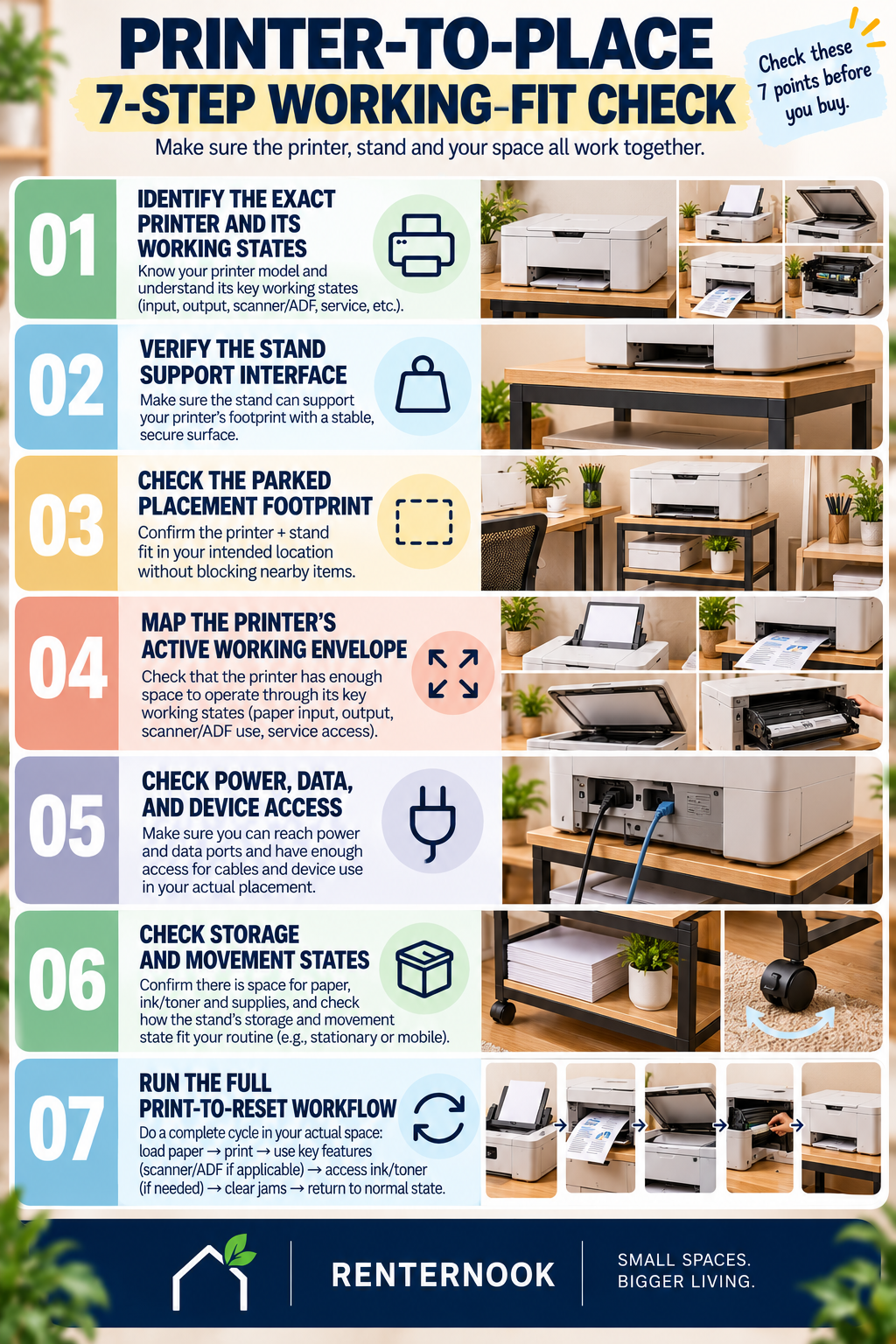
Use this sequence before treating any printer stand as a buying match.
Step 1 — Identify the Exact Printer and Its Working States
Start with the exact printer, not a generic label such as “laser printer,” “inkjet,” or “A4 printer.” Identify the states the device actually uses: parked, paper loading, printing, output collection, scanning or ADF use where applicable, cartridge or toner access, jam clearing, and routine service access.
If one of those states is not documented, keep it unknown. Do not replace missing printer information with a guess based on the closed body size.
Step 2 — Verify the Stand Support Interface
Check the exact surface that will support the printer and the load rating that applies to that surface.
This is where field specificity matters operationally. On the MI-7856, the verified total load is 200 lb, but the top is 100 lb and each lower shelf is 50 lb. Those values are not interchangeable. On the Yamazaki 4349, the top load is 9 kg, each upper shelf is 3 kg, and the lower shelf is 6 kg.
A load pass means only that the relevant published load condition has been satisfied. It does not prove full printer compatibility.
Step 3 — Check the Parked Placement Footprint
Now check the stand in the location where it will normally live.
The MI-7856 is 23.75 in wide × 20 in deep × 26 in high. The Yamazaki 4349 is 48 × 37 × 19 cm, with the 19 cm height excluding casters. The Safco 5208BL is 21 × 16 × 17.5 in. The MI-7851 is a different architecture: its published platform is 19.25 × 12.62 in and its height is adjustable up to 6.6 in.
These dimensions help establish the stand’s parked geometry. They do not establish the complete working envelope of a printer sitting on it.
This is especially important for under-desk placement. The Safco’s 17.5 in stand height does not prove under-desk fit because the printer adds height and may also need active clearance above it.
Step 4 — Map the Printer’s Active Working Envelope
This is the step most likely to be missed when a buyer looks only at the printer body and stand top.
Map what changes when the printer is used. That can include paper-input access, output-tray extension, scanner-lid opening, ADF operation, cartridge or toner access, jam clearing, ventilation, and service access.
For the four stands here, those exact printer active-state clearances are not verified by the stand specifications. They remain printer-specific unknowns.
The Yamazaki 4349 publishes a top recess of 44 × 34 cm and describes the available printer-base size as 44 × 34 cm or smaller. That is useful support-interface evidence, but it is not proof that every printer with a base inside that area will work through all of its active states. “A4 printer” is not a universal compatibility class.
Step 5 — Check Power, Data, and Device Access
A printer can be physically supported and still fail in daily use if its connections or controls become inaccessible.
The MI-7851 publishes rear cable management. That can help organize a cable path, but it does not prove that a specific power or data cable will reach the outlet, computer, network point, or other destination in the planned placement.
For the MI-7856, Yamazaki 4349, and Safco 5208BL, first-party cable features are not established in the locked evidence used here. Treat them as unknown rather than assuming a cable-management solution exists.
The same rule applies to device access. Rear ports, side controls, front trays, and service panels have to be checked on the exact printer.
Step 6 — Check Storage and Movement States
The stand itself may change state during use.
The MI-7856 is a three-tier mobile cart with casters and a locking function. The Yamazaki 4349 includes four optional casters. The Safco 5208BL has four swivel casters, two of which lock, plus a slide-out drawer measuring 21 in wide × 16 in deep × 3.5 in high. The MI-7851 is instead a stationary desktop/riser-type support with published non-skid EVA feet.
These facts describe the products. They do not prove that a loaded cart will roll easily on a particular floor, clear a particular route, or remain convenient once the exact printer and supplies are installed.
Storage also has to be evaluated by the field actually published. Do not invent lower-shelf dimensions for the MI-7856, shelf depths for the Yamazaki 4349, or lower-storage dimensions for the Safco 5208BL when those values are not verified in the locked evidence.
Step 7 — Run the Full Print-to-Reset Workflow
Finally, rehearse the entire routine rather than stopping at “it fits.”
Start with the printer parked. Load paper. Reach the controls. Print. Collect output. Use the scanner or ADF if the printer has one. Access ink or toner if that is part of the expected service routine. Move the stand if movement is part of the setup. Use the storage areas. Then return the printer and stand to their normal state.
At the end of this check, the result should be one of three things:
- PASS TO BUYING COMPARISON — the evidence needed for this placement and workflow is sufficient.
- HOLD AND VERIFY — a decision-relevant field is still unknown.
- FAIL THIS PLACEMENT / ROLE — the verified geometry, load, access, or workflow does not work for the intended use.
This is a printer-and-placement decision. It is not a generic furniture-specification scoring system.
4. Mount-It! MI-7856 Black: Large Mobile Cart
The MI-7856 is the largest support architecture in this comparison. Its verified overall dimensions are 23.75 in wide × 20 in deep × 26 in high, and it uses three tiers.
Its load ratings need to stay separated: 200 lb total, 100 lb on the top, and 50 lb on each lower shelf. A buyer should not read the 200 lb total as permission to place a 200 lb device on the top surface.
Its casters and locking function make movement part of the product architecture, which can be useful when the printer and supplies are meant to move together. But the exact caster count is not established in the locked evidence, and the evidence does not prove how a loaded cart will behave on a particular floor or route.
Separate top dimensions, lower-shelf dimensions, product weight, cable features, and printer active clearance remain unknown here.
Best use of the evidence: treat the MI-7856 as a large mobile printer-and-supply cart candidate, then verify the exact printer support surface and active workflow before calling it compatible.
5. Mount-It! MI-7851 Black: Compact Desktop / Riser Support
The MI-7851 solves a different placement problem. Its verified platform is 19.25 in wide × 12.62 in deep, it is height adjustable up to 6.6 in, and its published load is 22 lb.
Rear cable management and non-skid EVA feet are published features. Those are useful facts, but they should not be expanded into claims the evidence does not support. Cable management does not prove cord reach, and a 22 lb load pass does not prove the printer can operate through its full workflow on the stand.
This product should remain in the printer-support role. There is no need to turn the article into a monitor-ergonomics discussion simply because the form resembles a desktop riser.
For a real buying decision, compare the exact printer’s base and weight with the platform and load condition, then run the active-state checks in Steps 4 and 5.
6. Yamazaki Home Tower Desktop Printer Stand 4349 Black: Compact Storage With Optional Casters
The Yamazaki Home 4349 Black is a compact steel printer-storage system measuring 48 cm wide × 37 cm deep × 19 cm high, with the published 19 cm height excluding casters. Its product weight is 5,700 g.
The top recess is 44 × 34 cm, and the published available printer-base size is 44 × 34 cm or smaller. The top load is 9 kg. Each upper shelf is rated for 3 kg, while the lower shelf is rated for 6 kg.
Four casters are included and optional, so the stand can be considered in both stationary and caster-equipped configurations. The evidence used here does not establish whether those casters lock.
Upper-shelf depth, lower-shelf depth, cable features, locking-caster state, and active printer clearance remain unknown.
The key guard is simple: a printer base fitting inside 44 × 34 cm does not prove the full printer workflow fits. Do not turn an “A4 printer” description into a universal A4-printer compatibility claim.
7. Safco Onyx 5208BL Black: Low Mobile Stand With Drawer Storage
The Safco Onyx 5208BL is 21 in wide × 16 in deep × 17.5 in high and weighs 23 lb. Its top is 21 × 16 in. It also includes a slide-out drawer measuring 21 in wide × 16 in deep × 3.5 in high.
Movement is part of the architecture: it has four swivel casters, two of which lock.
A secondary exact-model source lists a maximum capacity of 100 lb. That field must remain labeled as secondary evidence because first-party load capacity is not established in the locked fact matrix.
The 17.5 in stand height should not be treated as proof that the complete printer-and-stand system will fit under a desk. The printer adds its own height, and an active printer may need additional top clearance for paper loading, scanning, ADF use, cartridge access, or service.
Lower-storage dimensions, first-party cable features, printer-on-stand total height, and active printer top state remain unknown.
8. What the Published Stand Specs Still Do Not Tell You
Across all four products, several decision-critical printer conditions remain outside the verified stand specifications:
- paper-input clearance;
- output-tray clearance;
- scanner-lid clearance;
- ADF operation;
- cartridge or toner access;
- service and jam-clearing access;
- ventilation;
- cord reach; and
- universal printer compatibility.
These are not zero. They are not automatic passes. They are unknown until the exact printer and placement are checked.
This distinction matters because a printer stand is an interface between three things: the printer, the stand, and the place. Evidence about one of those objects cannot automatically answer questions about the other two.
9. Common Buying Mistakes
Mistake 1: Checking only the printer base
The closed printer body is not the complete working envelope. Trays, lids, feeders, panels, cables, and service access can change the space required during use.
Mistake 2: Treating total load as top load
The MI-7856 shows why this matters. Its 200 lb total load and 100 lb top rating are separate fields.
Mistake 3: Treating a load pass as compatibility
A stand can support the printer’s weight and still block paper, scanning, output, controls, cables, or service access.
Mistake 4: Assuming a published cable feature solves cord reach
The MI-7851 has published rear cable management. That does not establish whether the exact printer cable reaches the required connection point.
Mistake 5: Assuming casters prove easy movement
Casters establish a movement architecture. They do not prove easy rolling on every floor, route clearance, or convenient movement under full load.
Mistake 6: Assuming “under-desk” from stand height alone
The Safco 5208BL is 17.5 in high, but the printer adds height and may need additional active clearance.
Mistake 7: Filling unknowns with nearby numbers
If shelf depth, active clearance, cable features, or a first-party load field is not verified, keep it unknown. Do not borrow a similar model’s number or convert a marketing role into a compatibility claim.
10. Final Printer-to-Place Checklist
Before buying, run the exact setup through these seven checks:
- IDENTIFY THE EXACT PRINTER AND ITS WORKING STATES
- VERIFY THE STAND SUPPORT INTERFACE
- CHECK THE PARKED PLACEMENT FOOTPRINT
- MAP THE PRINTER’S ACTIVE WORKING ENVELOPE
- CHECK POWER, DATA, AND DEVICE ACCESS
- CHECK STORAGE AND MOVEMENT STATES
- RUN THE FULL PRINT-TO-RESET WORKFLOW
Then classify the placement:
PASS TO BUYING COMPARISON if the evidence needed for the actual setup is sufficient.
HOLD AND VERIFY if a decision-relevant condition remains unknown.
FAIL THIS PLACEMENT / ROLE if a verified constraint makes the intended setup unworkable.
The key principle is straightforward: a printer fitting on a stand is not the same as the printer-and-stand system working in the room.
11. Sources and Methodology
This article is bounded to the four product identities and product fields verified upstream for Article 039: Mount-It! MI-7856 Black, Mount-It! MI-7851 Black, Yamazaki Home Tower Desktop Printer Stand 4349 Black, and Safco Onyx 5208BL Black.
Product facts are used only at the specificity established in the locked evidence. The Safco 5208BL 100 lb maximum-capacity field remains explicitly labeled as secondary exact-model evidence. Decision-relevant fields not established in the locked evidence remain unknown.
The article uses verified product evidence as input to the printer-specific PRINTER-TO-PLACE 7-STEP WORKING-FIT CHECK. It does not replace the generic furniture-dimension and evidence-sufficiency methodology owned by Article 032, and it does not treat source hierarchy or cross-source verification as the reader’s primary decision job here.