Rechargeable Motion Sensor Closet Lights for Renters: A Fit-First Buying Guide
No outlet inside the closet? A rechargeable motion-sensing light can make a dark shelf or hanging rail more usable without adding a hardwired fixture. But "wireless" does not mean "fits anywhere," and "motion sensor" does not mean the light will switch on reliably behind every door, coat, or stack of boxes.
For renters, the useful question is not which light wins a brightness contest. It is which lighting layout can fit your particular closet, detect the movement you actually make, recharge without becoming a chore, and come down under your lease’s rules.
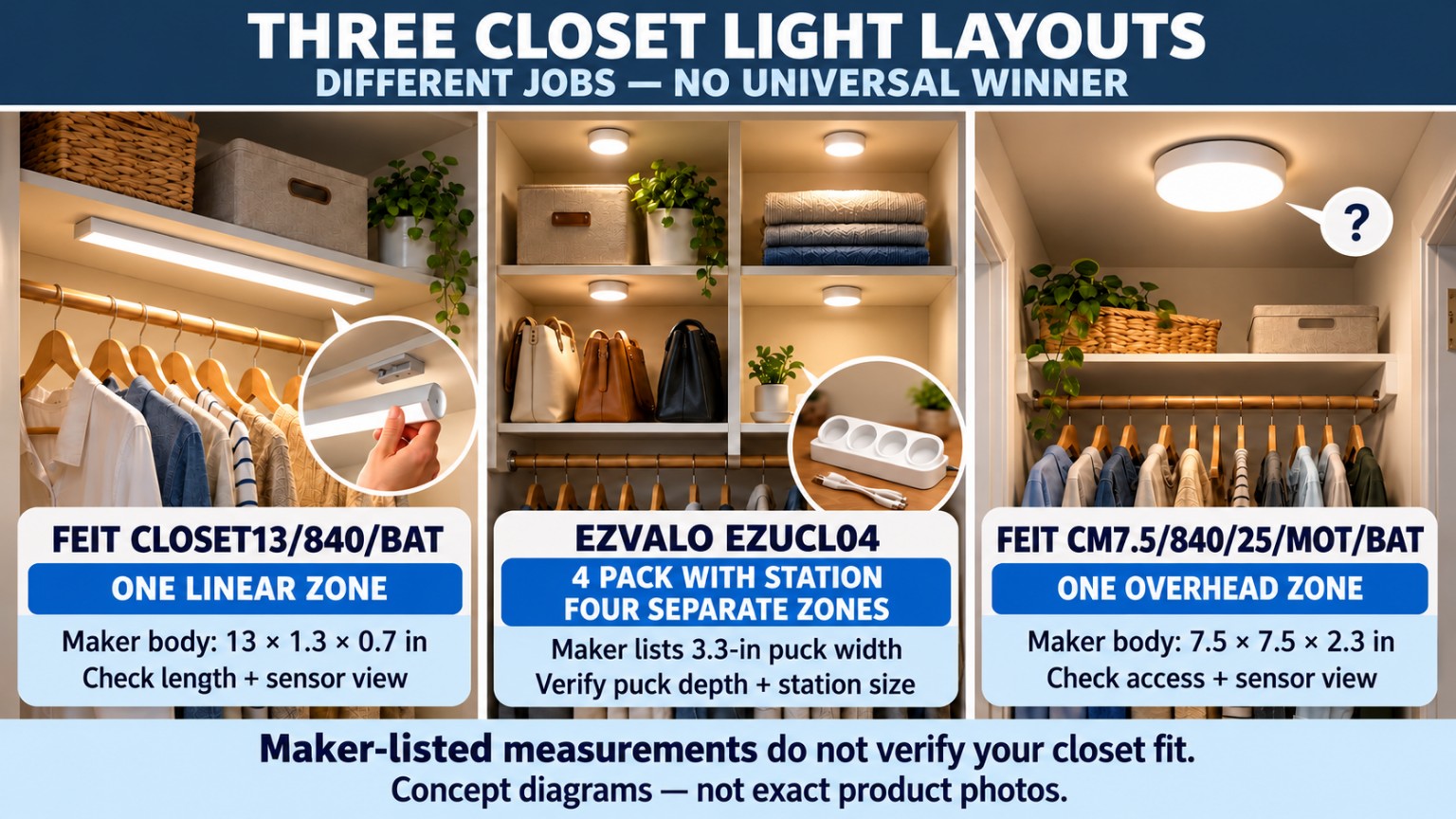
This guide compares three distinct approaches: one slim linear closet light, four small magnetic lights with a charging station, and one round overhead fixture. They solve different layout problems. The model and variant matter more than a generic product title, and none should be treated as a universal fit.
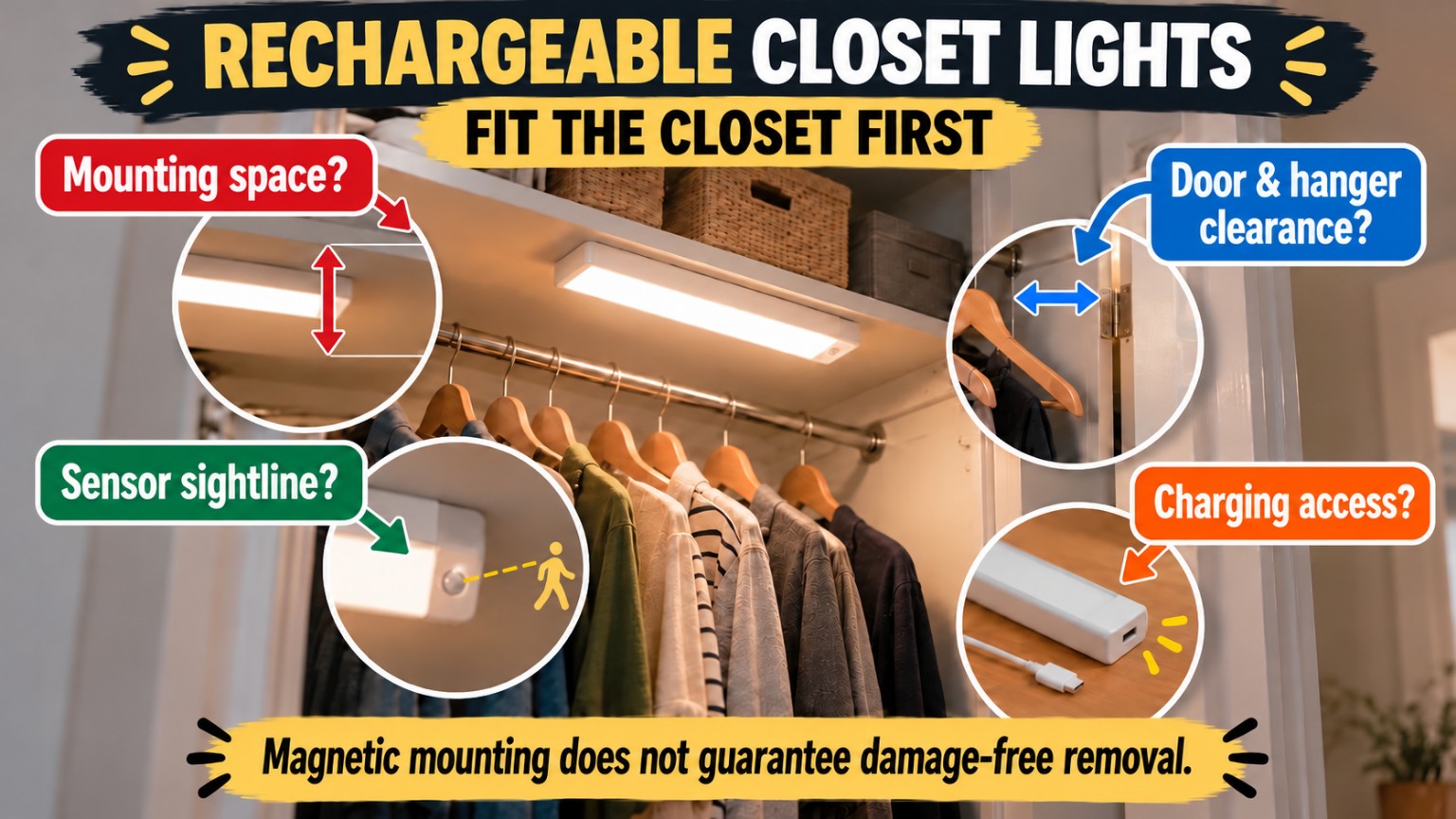
Quick decision: Start with the path through the closet, not with the light. Measure the mounting surface and door clearance; identify where a sensor can see motion; map the journey from the installed light to a charging point; then decide whether one line, several points, or overhead coverage matches your use.
1. The renter problem: the light is only one part of the fit
A closet may have a dark back wall, deep shelving, narrow side returns, sliding panels, a bi-fold door, or a swing door that blocks the very place where a light would go. A fixture may fit its shelf on paper but catch a hanger or be hidden behind jackets when in use. A motion sensor may work while the closet is empty yet miss the user’s usual hand movement once it is stocked.
A rechargeable light removes the need for a nearby hardwired connection during use. It does not remove the need for periodic charging, an approved mounting location, a compatible surface, or safe handling of the fixture and battery. A magnetic body can be quick to detach from its bracket, but that convenience is different from saying the bracket will release cleanly from rental paint, laminate, or wood.
Before selecting any model, answer four practical questions:
- Where can the light sit? Identify a flat, unobstructed area that does not interfere with doors, drawers, hangers, shelves, or moving items.
- What motion must it detect? Trace a normal action such as opening the door, reaching to a shelf, or walking into the space. A listed sensor range is not a site test.
- How will it charge? Plan how often you are willing to remove a fixture or rotate multiple lights, where the charging cable or station will sit, and whether the closet can remain usable while a unit charges.
- Can you mount and remove it appropriately? Read the maker’s instructions and the lease, check the finish and adhesive restrictions, and treat residue or surface damage as a real possibility.
2. First measure the closet, not the product listing
Use a tape measure, painter’s tape for temporary planning marks only when suitable for your finish, and a simple sketch. Do not use adhesive product hardware as a trial until the actual location and surface are confirmed suitable under the manufacturer’s directions.
Width, depth, and projection
Measure the usable flat surface, not just the closet’s overall width. For an under-shelf linear fixture, account for the shelf lip, mounting bracket, nearby hardware, clothing movement, and the clearance needed to slide or lift the light off its mount. For a round ceiling-style fixture, account for its full diameter and the distance it projects downward. For several small puck lights, plan each attachment point separately rather than assuming four clear spots exist because the closet is wide.
Door, shelf, and hanger movement
Open and close every relevant door through its full normal path. On a swinging door, mark the door’s arc. For bi-fold or sliding doors, look at the folded or overlapping panels. Move the hanging bar’s longest garments and pull out any sliding baskets or drawers. Leave extra operating clearance based on the actual fixtures and moving contents; the products in this guide do not establish a universal safe clearance.
Sensor sightline
Draw a line from the proposed sensor position to the movement you want it to notice. A solid shelf, a folded door panel, thick coats, or a cabinet side may block that line. Do not translate a maximum sensor-angle claim into a promise of performance in a recessed closet. Test the selected operating mode with the closet stocked, at the time of day when you actually use it.
Charging space
Identify a dry, accessible charging location and outlet. A four-light charging station needs its own unobstructed footprint, which is not verified for the exact locked EZVALO four-pack variant in the available evidence. Do not finalize a station spot from a product photo; confirm the actual dimensions and cable routing before purchase.
3. Three non-ranked lighting architectures
These are three roles, not first, second, and third place. The source-backed specifications are manufacturer-documented, not independent measurements of your closet or a guarantee of your installed results.
R1 — Feit Electric CLOSET13/840/BAT: one slim linear light
Product identity: Feit Electric, 13 in. Rechargeable LED Closet Light, model CLOSET13/840/BAT. The maker lists a body measuring 13 × 1.3 × 0.7 inches, a 100-lumen light output, and 4000K cool-white color temperature. It uses a rechargeable battery, adhesive-backed magnetic mounting brackets, and an included USB charging cable. The light can be removed from the brackets for charging. These are maker-documented specifications, not a promise of fit on a particular shelf or finish. [S1]
Role: A single line of light where a wall or underside of a shelf offers enough uninterrupted length and the sensor can see a meaningful approach or hand movement. One strip-like fixture may be simpler to manage than several separate units when the target is one shelf, one hanging section, or a narrow closet opening.
Check before choosing: A 13-inch fixture still needs usable mounting length plus room for brackets, adjacent hardware, and removal. Check whether a clothing rail, shelf lip, or swinging door blocks the sensor or the emitted light. The maker describes automatic motion sensing; do not assume a verified activation distance or angle, because a specific range is not established for this locked model in the qualified evidence.
Charging workflow: Remove the magnetic light from the brackets and use the included USB cable as directed. Confirm you can physically reach and detach it without disturbing closet contents. Its continuous-use runtime is not stated numerically here because maker materials conflict. A renter should evaluate charging frequency from real usage after installation, not from a disputed marketing number.
Mounting and removal: The product’s self-adhesive bracket system is a mounting option, not a guarantee that adhesive suits a particular paint, veneer, or lease. Plan how to protect access to the bracket and how to remove it according to the maker’s instructions. Do not assume "magnetic" means the adhesive bracket itself can be pulled away without marks.
R2 — EZVALO EZUCL04: four magnetic puck lights and charging station
Product identity: EZVALO EZUCL04, selected variant 4 Pack with Station, not a generic single-light or eight-pack option. The maker describes four small rechargeable magnetic lights, a charging-station variant, USB-C recharging, three color-temperature options (3000K, 4500K, and 6500K), and 50 lumens per light. It lists several control modes, including motion-triggered and always-on behavior. The exact mode behavior must be checked against the contents and instructions for the four-pack with station. [S2]
Role: A four-zone lighting system for separated storage areas—for example, an upper shelf, a hanging section, a side compartment, and a shoe shelf—when a single continuous bar of light would leave blind spots. Four smaller light points may help distribute light, but they also multiply the number of mounting locations and sensor sightlines that need checking.
Check before choosing: The maker lists a 3.3-inch-wide puck, but its materials conflict on thickness. Therefore no numeric thickness is accepted as a verified fit dimension in this guide. The charging station’s footprint is also unknown in the locked source record. Confirm the actual supplied puck and station dimensions before relying on tight shelf or drawer clearance. Verify that all four mounting locations permit garment movement and sensor activation.
Sensor behavior: The maker advertises motion detection within an approximate 10-foot, 120-degree field and different lighting modes; these are maker claims, not verified coverage for a closet full of fabric, doors, and shelves. It also describes an automatic shutoff after motion stops. Treat both as functions to test in the exact installed position, rather than an entitlement to uniform coverage from all four lights. [S2]
Charging workflow: Consider where the station will live and how you will take the four lights out of service to charge them. The selected bundle includes a station, but its exact footprint is not qualified. Check the delivered charging connectors and maker instructions for this variant before planning a permanent station shelf. Do not rely on a numeric battery-life promise: the maker’s same product materials report incompatible usage-duration figures. Actual charging needs depend on operating mode and how often movement triggers the lights.
Mounting and removal: The maker describes magnetic mounting using an included metal plate and adhesive application, or attachment directly to a suitable metal surface. Confirm actual magnetic contact, surface preparation requirements, and the finish underneath the plate. Neither magnetic mounting nor adhesive is a universal damage-free renter solution.
R3 — Feit Electric CM7.5/840/25/MOT/BAT: one round overhead light
Product identity: Feit Electric, 7.5 in. Round Rechargeable Motion Sensing Ceiling Light, exact model CM7.5/840/25/MOT/BAT. The maker lists 7.5 × 7.5 × 2.3 inches, 350 lumens, 4000K cool-white light, a 25Wh rechargeable battery, and motion activation. Its published "up to 5 hours" refers to continuous light on a charge under maker-stated conditions; it is not a prediction of elapsed calendar time between charges in a particular closet. [S3][S5]
Role: A more centralized overhead light for a closet that has a suitable ceiling or upper flat mounting zone and enough space for the fixture to project downward. Rather than several individual shelf lights, the goal is one overhead source from which a wider area may be illuminated. The installed result still depends on clothing, shelf shadows, and the sensor’s actual view.
Sensor behavior: The maker says the motion-triggered light remains on for about three minutes after a trigger. This is a manufacturer-described setting, not a verified response for every room or arrangement. A separate documented detection-range number for this exact model is not established in the locked source record; test normal entry and reaching movements. [S3]
Charging workflow: The light uses a magnetic backing on its mounting bracket and can be detached and charged via the included USB cable. Make sure the user can safely reach the fixture and remove it without climbing unsafely or pulling on adhesives. A high overhead location may look clean but be annoying to recharge.
Mounting and removal: Feit describes a mounting bracket with adhesive strips or screws. For a renter, the fact that an adhesive option exists does not guarantee permission, compatibility, or a mark-free exit. Screws are not assumed to be allowed. Verify the lease, the ceiling finish, the maker’s mounting instructions, and the safe removal route before committing. No remote-control feature is claimed for this MOT/BAT model; features on similarly named non-motion variants are not transferable.
4. Non-ranked comparison: match the architecture to the space
| Decision factor | R1 — Feit linear | R2 — EZVALO four-zone | R3 — Feit round overhead |
|---|---|---|---|
| Core job | One line along a shelf, wall, or narrow closet zone | Four distinct storage zones | One centralized upper/ceiling zone |
| Exact model | CLOSET13/840/BAT | EZUCL04, 4 Pack with Station | CM7.5/840/25/MOT/BAT |
| Maker-listed body | 13 × 1.3 × 0.7 in | 3.3-in-wide puck; thickness conflicted | 7.5 × 7.5 × 2.3 in |
| Maker-listed output | 100 lm, 4000K | 50 lm per puck; 3000/4500/6500K | 350 lm, 4000K |
| Mounting approach | Adhesive magnetic brackets | Magnetic puck to plate or compatible metal | Magnetic bracket with adhesive or screws |
| Charging method | Detach and connect USB cable | Recharge units; selected bundle includes station | Detach magnetic fixture and connect USB cable |
| Key fit test | Full 13-in mounting length and sensor view | Four clear spots, plus station footprint | Overhead projection, access, and sensor view |
| Important unknown | Real-world sensor range; runtime claim conflict | Puck thickness, station footprint, battery duration in use | Installed sensor coverage; actual interval between charges |
How to use this table: Do not choose by lumen count alone. Lumens describe maker-listed light output, not how evenly a crowded closet will be illuminated. For an individual renter, location, sightline, charging access, and lease/surface restrictions may override advertised output. The three rows are role descriptions—not awards or a product ranking.
5. Sensor placement: why "motion sensing" can disappoint
Motion sensors need an unobstructed view of a useful movement. A unit may detect someone walking through an open closet but miss a hand reaching behind a door. One light may activate while its neighbor remains off. Closing a door can change both the sightline and ambient-light conditions, especially where a mode only triggers in low light.
Use this placement test before making any permanent attachment:
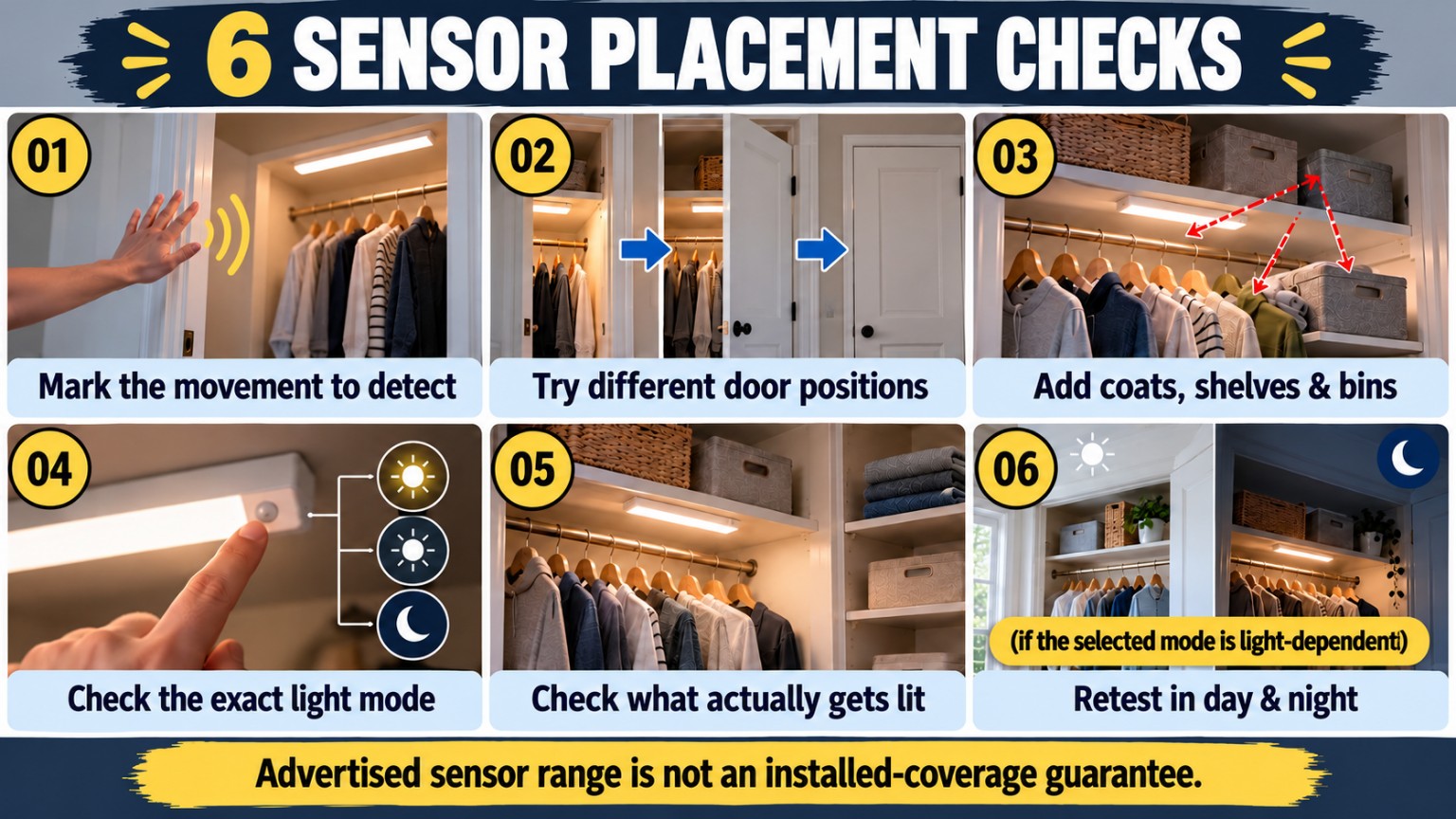
1. Sketch the proposed sensor position and identify the first movement you expect to trigger it.
2. Repeat with the door fully open, partly open, and closed where safe and relevant.
3. Recreate the real closet: hanging coats, stacked bins, and the usual shelf contents.
4. Check the selected motion/day-night/always-on mode against the exact product instructions.
5. Confirm the light reaches the object you want to see, not just the closet opening.
6. Repeat at night and in daylight if the mode changes with ambient light.
Where temporary positioning is safe and manufacturer-permitted, test a unit before committing to adhesive. Where it is not safe or permitted, leave the location unapproved until the appropriate mounting method is established. An advertised detection angle is not a guarantee of an installed sensing zone.
6. The charging routine is part of the buying decision
A rechargeable light solves wiring problems but introduces a maintenance routine. Think about this before buying rather than after the first unexpected dark closet.
For one removable linear light: Check the bracket release direction. Is there enough space to slide it free without moving clothing or lifting a heavy storage bin? Is the USB cable accessible after removal?
For four small pucks: Plan whether you will recharge all four together or rotate them. Reserve a stable station location near an appropriate power connection. The EZVALO station’s verified physical footprint is unknown here, so do not treat a photo as a measurement. Ensure each puck returns to its intended mounting point and mode.
For one overhead light: Confirm that removal can be done safely and repeatedly. If reaching the fixture requires moving furniture or using unstable steps, the elegant placement may create an inconvenient—and potentially unsafe—maintenance path.
A useful personal check: Record how many days pass until the installed setup needs charging under your own normal use. This observation is more meaningful than merging incompatible runtime claims from product literature. It is not a substitute for battery safety, approved charging equipment, or following manufacturer instructions.
7. Mounting, surfaces, and move-out risk
A mounting option is not the same as a lease-approved or damage-free installation. Adhesive can react differently to paint, wallpaper, unfinished wood, textured drywall, veneer, and surfaces that have been cleaned or repaired. Magnetic mounting works only where the product’s system has an appropriate attachment surface or bracket. Screw installation may be disallowed without permission.
Before mounting, check the manufacturer’s surface preparation, weight/holding, and removal directions and the lease or landlord’s written requirements. If a surface is valuable, fragile, freshly painted, damp, or otherwise uncertain, seek a suitable authorized mounting approach rather than assuming that peel-and-stick is harmless. Do not block ventilation, doors, emergency access, or other working hardware.
At move-out, follow the specific maker’s removal guidance. Never promise residue-free removal, scratch-free contact, or zero repair cost. Keep the installation instructions, photos of the original surface condition, and any written lease approval where applicable. These records help document what was done; they do not establish permission or eliminate liability.
8. Buyer checklist — confirm before checkout
☐ Exact SKU/variant: I am ordering CLOSET13/840/BAT, EZUCL04 4 Pack with Station, or CM7.5/840/25/MOT/BAT—not a look-alike or unrelated variant.
☐ Placement map: I know the exact shelf, wall, or ceiling zone each unit would occupy.
☐ Usable dimensions: I measured the actual clear area and left room for bracket hardware, doors, garments, and removal.
☐ Door movement: I verified the full motion of hinged, bi-fold, sliding, and nearby storage components.
☐ Sensor view: I identified the normal movement each sensor must detect and potential obstructions.
☐ Light path: I checked whether shelves or hanging clothes will shadow the items I need to see.
☐ Surface and lease: I read mounting and removal directions and checked what my rental permits.
☐ Charging access: I can remove, carry, charge, and reinstall the light safely.
☐ Station space: For R2, I obtained the station footprint and verified the charge location; I did not assume it from photographs.
☐ Conflict check: I did not treat R1/R2 advertised runtime or R2 thickness as a confirmed fit or maintenance figure.
☐ Operating modes: I checked the exact variant’s available controls and settings rather than assuming features from another SKU.
☐ Purchase terms: I confirmed current U.S. delivery availability, returns, warranty, and the seller’s exact model before paying; no stock or price is guaranteed by this guide.
If a line is unknown, keep it unknown until checked. A missing dimension or untested mounting surface is not a passing result.
9. An eight-step fit-first decision path
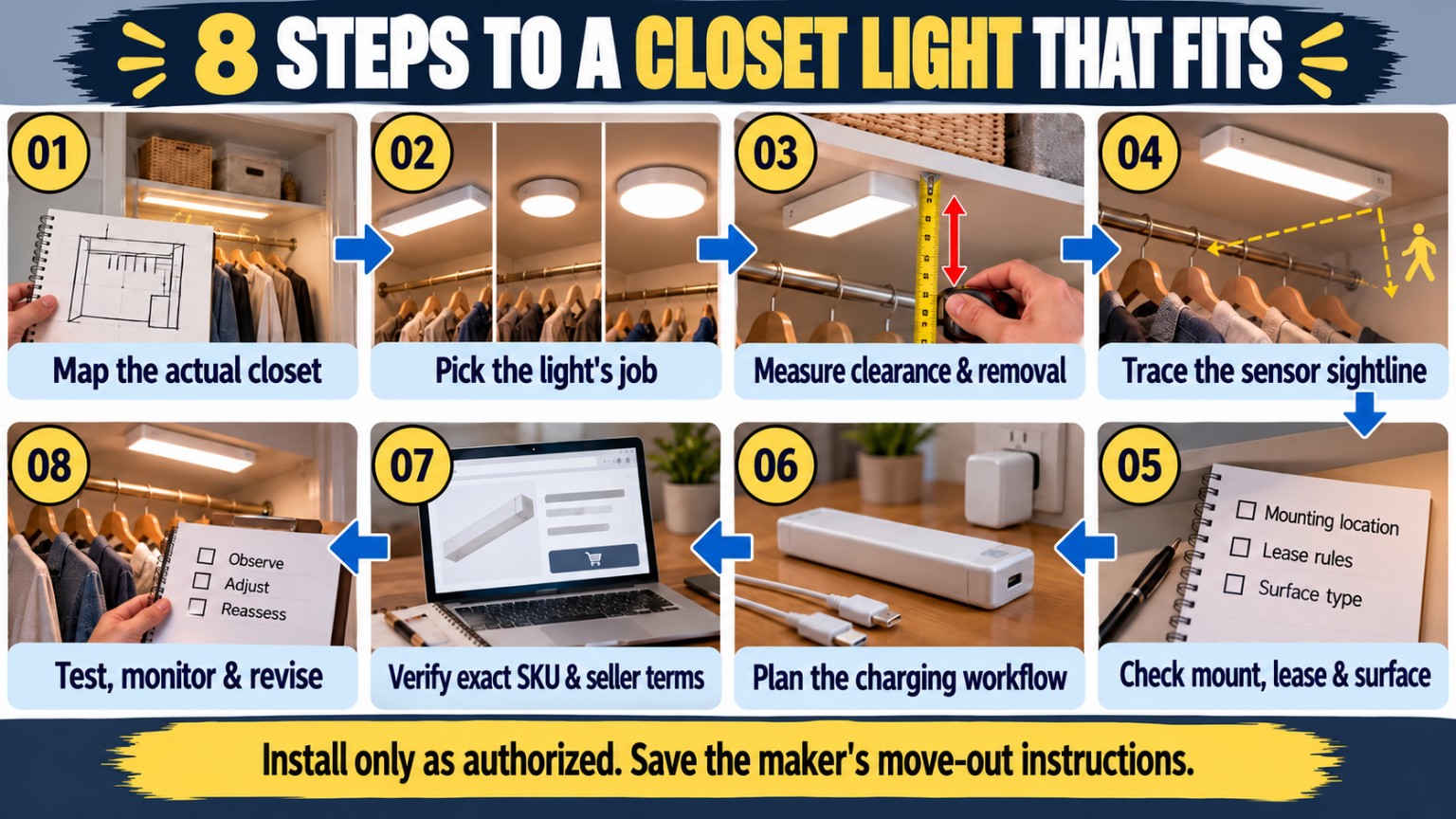
01 — Map the actual closet. Note doors, hanging rails, drawers, bins, shelf lips, ceilings, and the area you want to illuminate. Mark usable mounting surfaces, not just gross closet dimensions.
02 — Pick the light’s job. Choose the role you need: one linear zone, four separated zones, or one round overhead zone. Do not select a brand before determining which architecture makes sense.
03 — Measure clearance and removal space. Check the manufacturer’s listed body dimensions and the space needed to fit, detach, and recharge each unit. For R2, pause on unverified thickness and charging-station footprint.
04 — Trace the sensor sightline. Identify the movement you want to trigger the light. Consider doors, clothing, shelves, and daylight conditions. Treat the maker’s range as a claim to validate in place, not an installed guarantee.
05 — Check mounting approval and surface risk. Compare adhesive, magnetic-plate, and screw options with the exact maker directions and your lease. Stop if the surface or permissions are uncertain.
06 — Design the charging workflow. Map where and how you will charge each light or the four-light station. Check access, cable placement, and safe handling; do not substitute disputed runtime figures for a plan.
07 — Verify the exact product and seller terms. Match SKU and selected pack, review official manuals, and verify dimensions, included accessories, applicable return terms, and current shipping availability for your ZIP code.
08 — Test, monitor, and revise after authorized installation. Test detection and illumination with normal closet contents. Observe charging frequency, surface condition, and door movement. Reposition only in ways the maker and rental agreement permit. Preserve move-out instructions and photos.
This sequence is deliberately fit first. It does not guarantee a perfect closet, a certain battery duration, or a mark-free move-out.
10. Common buying mistakes
Buying only by lumens. Output matters, but one brighter light may leave deep shelf shadows that a more distributed layout addresses. The reverse can also happen: several lights may be unnecessary if one accessible mounting zone does the job.
Confusing "magnetic" with "no surface risk." Many magnetic products still rely on a plate or bracket fixed to the closet. Removing the light body is different from removing the mount.
Assuming the sensor sees around corners. Shelves, garments, cabinet sides, and doors can block the view. Test the useful movement, not a promotional range diagram.
Ignoring charging access. A hard-to-reach fixture or a missing station shelf can turn a rechargeable solution into an inconvenient routine.
Treating disputed numbers as specifications. R1/R2 runtime and R2 thickness have documented conflicts; this guide does not resolve them with guesses or average values. Obtain exact variant documentation before fitting a tight space.
Assuming the rental allows any adhesive. The lease and surface matter. No product in this comparison is certified here as universally damage-free, scratch-free, or permission-free.
11. Frequently asked questions
Do rechargeable motion sensor lights need a closet outlet?
Not while operating from their rechargeable battery. They do need an appropriate charging method and power access when recharging. Check the cable or station supplied with the exact variant, and plan where that process will occur.
Does "no wiring" mean "no drilling" or "renter-approved"?
No. R1 uses an adhesive magnetic bracket; R2 uses magnetic mounting with a plate or compatible metal surface; R3 offers adhesive strips or screws for its bracket. Whether an option is suitable or permitted depends on your surface, the manufacturer’s instructions, and your lease.
Which is best: one bar, four pucks, or one overhead light?
There is no universal winner. A line may suit one shelf or hanging zone; four lights may support separate compartments; an overhead light may make sense where a safe accessible upper mounting zone exists. Choose the job first, then verify the physical and sensor fit.
Will a light turn on every time I open the closet door?
Not necessarily. The maker may describe motion activation, but sensor placement, door geometry, obstructions, mode settings, light conditions, and the movement itself affect what happens. Test a normal opening and retrieval routine with the closet stocked.
How long does one charge last?
It varies by product, operating mode, triggering frequency, brightness, environment, and battery condition. Conflicting maker claims prevent a reliable numeric runtime comparison for R1 and R2 here. Feit’s R3 claim of up to five hours applies to continuous-use illumination under manufacturer conditions; it is not a promise about days or weeks between charges. Measure your real routine after setup.
Is the EZVALO four-pack charging station guaranteed to fit a narrow shelf?
No. Its exact footprint is not verified in the locked evidence. Obtain the station’s real dimensions and cable-clearance requirements before choosing a charging shelf.
Can I put adhesive on painted or wooden closet surfaces and remove it cleanly?
Do not assume so. Surface coating, age, preparation, adhesive type, and removal method can affect residue or damage. Follow the maker’s guidance and the lease; seek permission or a different location if the finish is uncertain. This article does not guarantee damage-free removal.
Can I use the R3 light’s remote-control features?
No remote-control capability is asserted for CM7.5/840/25/MOT/BAT in this guide. Do not borrow a feature described for a similarly named non-motion model. Consult the exact product manual.
Do all four EZVALO pucks need separate mounting checks?
Yes. Each position can have different obstructions, adhesion conditions, and movement paths. Also verify where the four lights charge and how you will return them to the intended spots after charging.
Are the products in stock now, and what do they cost?
No live inventory, ZIP-level delivery promise, or price guarantee is made here. Check the exact SKU and selected pack with the retailer at checkout, including applicable shipping, returns, and warranty terms.
12. The practical takeaway
Rechargeable closet lighting is a useful renter option when you match the setup to a real space rather than a generic product photo. Feit’s 13-inch linear light, EZVALO’s four-station variant, and Feit’s round overhead motion light represent three different jobs. None removes the need to measure, test a sensor’s view, plan charging, and respect a rental surface.
If you have only one question before buying, make it this: Can I show exactly where this light will go, what movement will activate it, how I will charge it, and how I will remove it under the lease? If any answer is missing, keep that item on the checklist. A fit-first buying decision is better than a confident guess.
Official manufacturer references
- [S1] Feit Electric — CLOSET13/840/BAT product page: https://www.feit.com/products/13-in-rechargeable-led-closet-light-closet13-840-bat
- [S2] EZVALO — EZUCL04 motion-sensor closet lights, 4 Pack with Station option: https://www.ezvalo.com/products/ezvalo-ezucl04-motion-sensor-closet-lights
- [S3] Feit Electric — CM7.5/840/25/MOT/BAT product page: https://www.feit.com/products/7-5-in-round-rechargeable-motion-sensing-ceiling-light-cm7-5-840-25-mot-bat
- [S4] Feit Electric — CLOSET13/840/BAT manufacturer specification sheet: https://appshopfy.feit.com/storage/files/pdfs/CLOSET13-840-BAT_SpecSheet.pdf
- [S5] Feit Electric — CM7.5/840/25/MOT/BAT manufacturer specification sheet: https://appshopfy.feit.com/storage/files/pdfs/CM7.5-840-25-MOT-BAT_SpecSheet.pdf